Basic microcontroller concepts
Content aligned with Topic 1 — Basic concepts from the Microcontrollers course (UNEXPO · Mechatronics), based on Prof. Ing. Yoel Pire’s material.
What is a microcontroller
Section titled “What is a microcontroller”A microcontroller (μC) is a programmable integrated circuit that puts the basic blocks of a tiny computer on one chip:
- CPU — executes program instructions step by step.
- Memories — store the program and working data.
- Input/output lines — connect the chip to LEDs, buttons, sensors, etc.
- Peripherals — internal or external modules that extend what the device can do.
To use it you write firmware: the CPU reads instructions stored in memory and runs them. There is no operating system like on a PC; control is direct.
Internal blocks and their registers
Section titled “Internal blocks and their registers”Before the PIC, Topic 1 studies the general microcontroller scheme. The CPU has general-purpose registers (variables) and six special registers. Those six are the ones the professor names. The PIC18, later, gives them other names.
| Special register | What it is |
|---|---|
| IR — instruction register | Holds the instruction the CPU is executing. The programmer does not see it. On the PIC18 it stays internal: you do not write it in the .ASM. |
| ACC — accumulator | The ALU result lands here, under the ALU. That same value can go back in as an operand. The PIC18 has no classic accumulator. The close match is W (WREG), and it sits before the ALU. |
| Status register | Result flags: zero, carry, sign. On the PIC18 it is STATUS. |
| PC — program counter | Address of the next instruction. It advances on its own, unless there is a jump. On the PIC18 it keeps the same name: PC. |
| Data-address register | Address of a data byte. Used for indirect addressing. It is not the memory. On the PIC18 it is FSR (the byte is read with INDF). |
| SP — stack pointer | Marks the top of the stack. The stack stores addresses, not variables. On the PIC18 it is STKPTR. Older PIC texts say there is no visible SP; the PIC18 does have this one. |
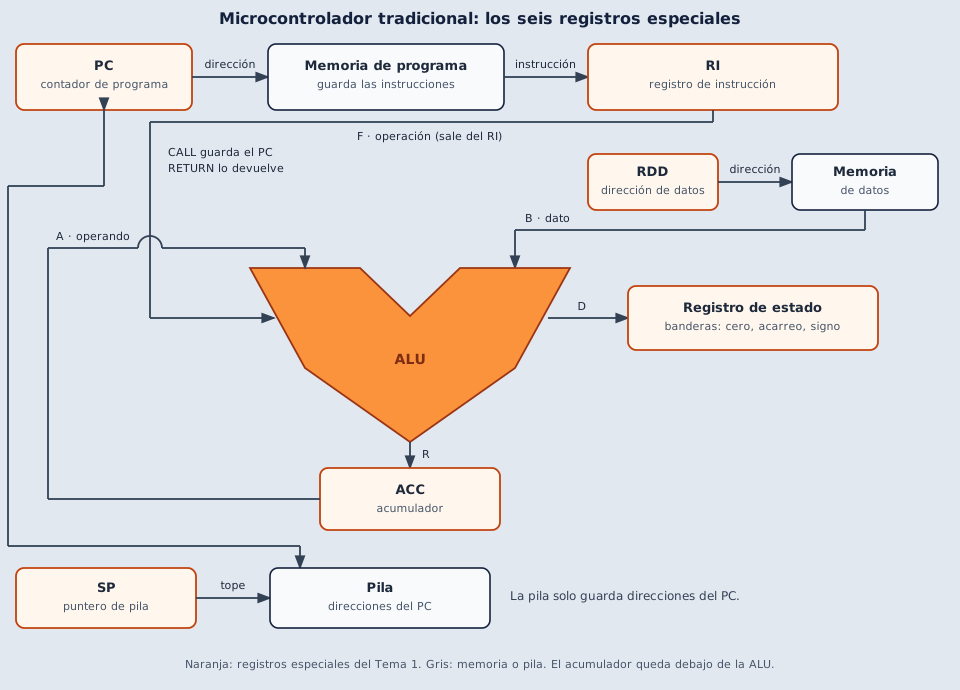
An orange box is a register. A gray box is the place that register points to.
The SP is the orange box: it holds one number, the address of the top. The stack is the gray box: the storage where the PC addresses sit. The arrow labeled “top” runs from that register to the upper slot. CALL stores the PC address there. RETURN takes the one on top and loads it back into the PC.
The data-address register works the same way. The orange register carries the address of the byte. Gray data memory is where the byte sits.
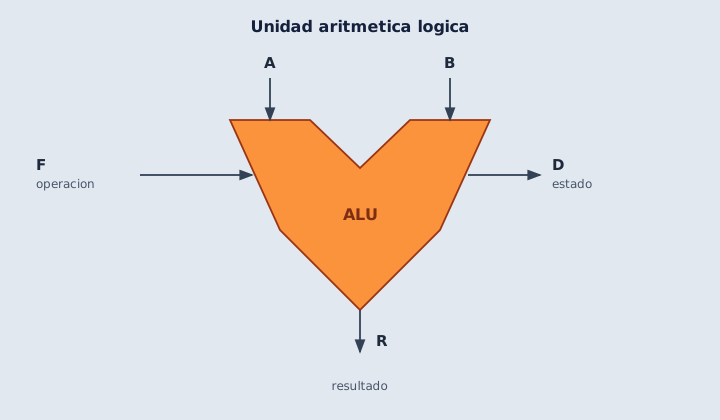
The ALU does the arithmetic: add, subtract, AND, OR, and the comparisons. The Topic 1 symbol is this V.
| Letter | What it is |
|---|---|
| A and B | The two operands that enter |
| F | The kind of operation. The IR selects it |
| R | The result. In the general scheme it lands in the accumulator |
| D | The status of that result: zero, carry, sign. It goes to the status register |
Code-level detail is in Architecture.
Stack: LIFO, PUSH, and POP
Section titled “Stack: LIFO, PUSH, and POP”The stack is LIFO (Last In, First Out): the last item in is the first one out. The SP does not store those addresses: it marks which one is on top. The stack is what stores them.
- PUSH stores an address (usually the PC, so the CPU knows where to return).
- POP removes that address and loads it back into the PC.
A subroutine call PUSHes “where we were”. When it finishes, POP restores the PC. Without that pair there is no way back.
Microprocessor vs microcontroller
Section titled “Microprocessor vs microcontroller”| Microcontroller (μC) | Microprocessor (μP) | |
|---|---|---|
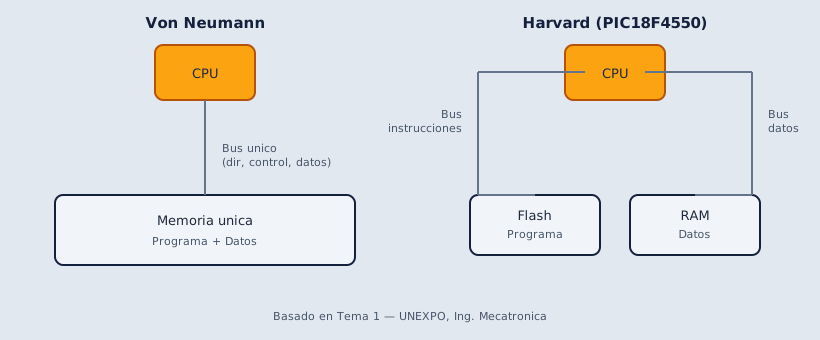
| What it integrates | CPU, memory, buses, and peripherals in one chip | Only the CPU (processor) |
| System type | Closed — complete computer with fixed capability | Open — you attach external memory, I/O, and peripherals |
| External pins | Lines that drive peripherals and ports | Address, data, and control buses to build a PC |
| Programming | You focus on the application | You must also manage external devices |
| Academic example | PIC18F4550 (single chip) | Classic PC CPU in a socket (RAM, chipset, and storage live on the motherboard, not inside the processor chip) |
Raspberry Pi and similar boards: not the same thing
Section titled “Raspberry Pi and similar boards: not the same thing”A Raspberry Pi is not a microcontroller or a bare microprocessor. It is a single-board computer (SBC) — a mini PC already assembled on the board:
- An SoC (System-on-Chip): application ARM cores, GPU, and other blocks in one integrated circuit.
- RAM included on the board (soldered or in the SoC package, depending on model).
- USB, HDMI, network, power, and GPIO connectors.
- microSD (or internal storage) for the operating system and your programs.
You do not start from an empty chip and add RAM like in an academic μP-only design: the board is already a complete computer. It runs Linux (a full OS), not direct firmware burned to Flash like on the PIC.
| PIC18F4550 | Raspberry Pi | |
|---|---|---|
| What it is | Microcontroller (μC) | Single-board computer (SBC) |
| Program | Firmware in chip Flash | OS + apps on SD card / Linux |
| Memory | Flash, RAM, and EEPROM inside the chip | RAM on the board + storage on SD |
| Study level | Registers, bits, assembly | Python, Linux, high-level drivers |
Internal and external peripherals
Section titled “Internal and external peripherals”Peripherals let the μC interact with the world. They can be inside the chip or wired outside.
Internal peripherals (on-chip)
Section titled “Internal peripherals (on-chip)”Modules the manufacturer builds into the microcontroller. On the PIC18F4550 you will find, among others:
- Timers / counters (Timer0, Timer1, Timer2)
- A/D converter (ADC)
- UART / USART (serial communication)
- PWM / CCP module
- SPI and I2C interfaces
- USB (on the 4550)
- Internal EEPROM memory
External peripherals (wired to the μC)
Section titled “External peripherals (wired to the μC)”Devices not inside the chip, connected to pins:
- Sensors (temperature, pressure, distance…)
- Communication modules (Bluetooth, Wi-Fi, GPS…)
- External memories
- LCD or OLED displays
- 7-segment displays
- Matrix keyboards
- Motors, relays, drivers
In the lab you use both: the PIC’s internal ADC and, for example, an external LCD wired to GPIO ports.
Memory types
Section titled “Memory types”Program memory (fabrication technology)
Section titled “Program memory (fabrication technology)”By how firmware is stored, the course distinguishes:
| Type | What it is | Reprogrammable |
|---|---|---|
| ROM | Program burned at the factory | No |
| OTP | One-Time Programmable — written once | No |
| EPROM | Electrically programmed; erased with UV light | Yes (UV erase) |
| EEPROM | Electrically programmed and erased | Yes |
| Flash | Electrically programmed; PIC18F4550 stores your .hex here | Yes |
On the PIC18F4550 the program lives in Flash (non-volatile: kept when power is off). Data you want to keep between power cycles can go in internal EEPROM.
Data memory (at runtime)
Section titled “Data memory (at runtime)”| Type | Role in the μC |
|---|---|
| RAM | Temporary variables, counters, flags while the program runs. Lost on power-off unless saved elsewhere. |
| Special registers (SFR) | Control ports, timers, ADC, etc. (covered in Foundations). |
Typical applications
Section titled “Typical applications”A microcontroller can be used in:
- Sensor and actuator control
- Industrial process control
- Medical equipment and robotics
- Appliances and human-machine interfaces (keyboard, display)
- Motor control (PWM)
- Communication (SPI, I2C, UART, USB)
- Clocks, alarms, calculators, and many more
Next step
Section titled “Next step”You now know the general Topic 1 concepts. Continue with What is the PIC18F4550 to see how these blocks apply to the chip you will use in the lab.
Basic microcontroller concepts
Based on: Tema 1. Conceptos Básicos (1).pdf
0 of 0 answered
Sign in with CALETAS to sync this result across devices.
Sign in with CALETAS